ShapeOko Grbl settings calculator
เขียนโดย supak @ พฤศจิกายน 30, 2558
0 ความคิดเห็น

Blog ที่รวบรวมการใช้งาน การพัฒนาและการแก้ปัญหา ของ GRBL CNC Controller สร้างโดย Panmaneecnc.com
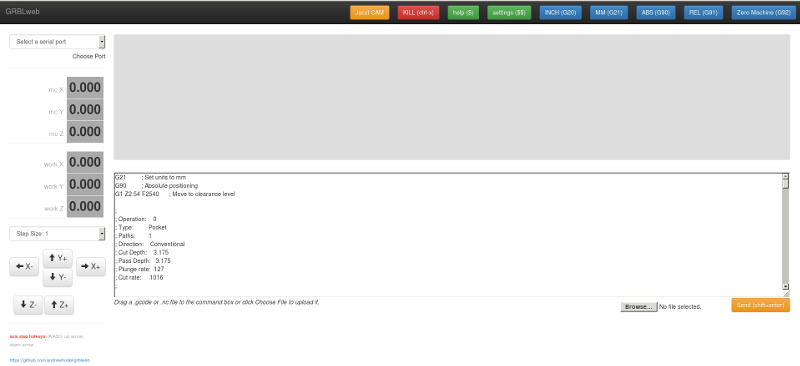
git clone https://github.com/andrewhodel/grblweb.git
cd grblweb
npm install
node server.js
npm install -g forever
forever start server.js


ป้ายกำกับ: g code sender, grbl web
เขียนโดย supak @ พฤศจิกายน 30, 2558
0 ความคิดเห็น


ป้ายกำกับ: g code sender, grbl web
เขียนโดย supak @ พฤศจิกายน 30, 2558
0 ความคิดเห็น


ป้ายกำกับ: g code sender
เขียนโดย supak @ พฤศจิกายน 30, 2558
0 ความคิดเห็น
SD CARD G CODE SENDER FOR GRBL with Auto Tool Changer (Stand Alone CNC Controller Support M98 M99 G81)
CNC Controller ที่ไม่ต้องใช้ PC ควบคุม ใช้เพียงการอ่านข้อมูลจาก SD Card หมดปัญหาเรื่อง การติดตั้งโปรแกรม , ระบบ Windows , รวมถึงการป้องกัน Virus ทำให้การทำงานไม่ติดขัดอีกต่อไป. Download และ ใช้งานได้แล้ว รวมถึงการใช้ Auto Tool changer และ Function อื่นๆ ..GRBL CNC Controller เป็น CNC Controller ที่มีผู้นิยมใช้กันในกลุ่ม OPEN Source แบบ Embedded กันอย่างกว้างขวาง และ มีผู้พัฒนาต่อ เป็นจำนวนมาก แต่มีข้อจำกัด บางประการ ที่ทำให้ ความสามารถบางประการหายไป เมื่อเทียบกับ PC Base cnc controller เช่น KCAM , Mach3 , Linuxcnc , USB CNC แต่เราสามารถ เพิ่มขีดความสามารถเหล่านั้นได้ เนื่องจากผู้พัฒนา GRBL ได้เขียน โปรแกรมรองรับการพัฒนาไว้ให้แล้ว เราคิดว่า การต่อ ยอดความคิด น่าจะดีกว่าการแข่งขัน จึงได้มีโครงการนี้ขึ้นมา
ความต้องการเบื้องต้นเช่น
1.อ่าน ข้อมูล G code จาก SD Card หรือ media อื่นๆ ได้อย่างอิสระ ไม่ต้อง อาศัย PC เป็นตัวส่ง G Code2.ทำการควบคุม CNC โดยไม่ต้องใช้ PC 3.เพิ่มเติม Function พิเศษ เช่นการทำ 2D Scan ,3D Scan, Probe , Auto Zero Z , Auto Profile หรือ Function อื่นๆ อีกมากมาย (Not Complete)
Keyboard Mapping Design| Support Item | Support G Code Command | GRBL 09i | SD Card Gcode Sender |
|---|---|---|---|
| Non-Modal Commands | G4, G10L2, G10L20, G28, G30, G28.1, G30.1, G53, G92, G92.1 | Support | |
| Motion Modes | G0, G1, G2, G3, G38.2, G38.3, G38.4, G38.5, G80 | Support | |
| Feed Rate Modes | G93, G94 | Support | |
| Unit Modes | G20, G21 | Support | |
| Distance Modes | G90, G91 | Support | |
| Arc IJK Distance Modes | G91.1 | Support | |
| Plane Select Modes | G17, G18, G19 | Support | |
| Tool Length Offset Modes | G43.1, G49 | Support | |
| Cutter Compensation Modes | G40 | Support | |
| Coordinate System Modes | G54, G55, G56, G57, G58, G59 | Support | |
| Program Flow | M0, M1, M2, M30* | Support | |
| Coolant Control | M7*, M8, M9 | Support | |
| Spindle Control | M3, M4, M5 | Support | |
| Valid Non-Command Words | F, I, J, K, L, N, P, R, S, T, X, Y, Z | Support | |
| Load G code From SD card | Support | ||
| PS2 Key Board Control | Support | ||
| LCD Monitor | 16 x 2 LCD Monitor | Support | |
| Manual Data Input Mode ( MDI ) | Support | ||
| Motion Support | G81 (Drilling) | Support | |
| Auto Tool Changer | M6 T(N) | Support | |
| Program Flow | M98 M99 (Subprogram Call And sub Program End) | Upcoming | |
| Auto Zero Z | Support | ||
| PID Spindle | S (Command) | Upcoming | |
| Single Block Run | Single Block And Continuous Run | Support | |
| Feed Rate Control | Feed Rate Override 25% 50% 75% 100% 125% 150% | Support | |
| Network File Transfer System | Wifi File Transfer | Support | |
| Start From Specific Line | Upcoming | ||
| Web Application Controller | Upcoming | ||
| Real Time Jogging | Test Uncomplete | ||
| Web Graphic G Code Preview | Upcoming | ||
| PC Base cnc controller Key Map | Support | ||
| Automation System | Upcoming | ||
| CNC Communication Network | Upcoming | ||
| Auto Machine Configuration | Upcoming | ||
| Internet Service And Fault Report | Upcoming | ||
| Auto level | Upcoming | ||
| Center and Edge Finder | Upcoming |
G code File name on sd card is
o001.cnc,o002.cnc,o003.cnc,o004.cnc,o005.cnc,o006.cnc,o007.cnc,o008.cnc,o009.cnc
Software Instruction Not Complete If You Have any Comment Please tell me know
Can List On next version Please Follow US at GITHub

If you have any comment or bug reports please send to panmaneecnc@outlook.com

 Credit https://github.com/grbl/grbl/wiki/Connecting-Grbl
การทดสอบล่าสุด 13 / 07 / 2557 ได้ผลเป็นที่น่าพอใจ
Panmaneecnc Family Teamความคิดข้างต้น เกิดจาก ประสบการณ์ และ วิสัยทัศน์ ของเรา การทำงานนี้ เป็นการทำงานกัน เป็นทีมงาน มิได้เป็นผลงานของคน ๆ เดียว ดังนั้น บุคลากรในทีมงาน จะมีความสามารถของแต่ละบุคคลต่างกัน
เราจะต้องใช้เวลาในการพัฒนางานของเรา และ ต้องเรียนรู้อีกมากมาย... เนื่องจากเรายังไม่เก่งพอ
PANMANEECNC TEAMป้ายกำกับ: g code sender, grbl embeded, sd card
เขียนโดย supak @ พฤศจิกายน 30, 2558
0 ความคิดเห็น


ป้ายกำกับ: การแก้ปัญหา GRBL
เขียนโดย supak @ พฤศจิกายน 30, 2558
0 ความคิดเห็น
| ชนิด | Link | รายละเอียด |
|---|---|---|
| SD Card G Code Sender | SD Card G Code Sender | USE SD Card For Sending Code And Control GRBL Like Mach3 BY Panmaneecnc Team Adding Automatic Tool change (M6) , Drill Function (G81) , Macro Sub Program (M98,M99) |
| G code sender | GcodeSender | G-code sender โดย Otto Hermansson |
| G code sender | GCtrl | Processing Script to stream Gcode |
| G code sender and previewer | Universal-G-Code-Sender | จาวา สคริปโดย Will Winder. Cross-platform (Win32, Win64, Linux, MacOS). มีความสามรถเพิ่มเติม : Truncate decimal point precision to a configurable amount, Remove whitespace, Remove comments, Override speed rates, Arc to line conversion. |
| G code sender and previewer | Grbl Controller | Cross-platform graphical Grbl Controller for Mac, Windows and Linux originally written by Kosme, currently maintained by zapmaker. Allows you to jog X, Y, Z, and see the current position. Newer versions include a previewer, v3.4 will trim too-long lines |
| G code sender | grblfeeder | Python serial terminal designed for sending gcode files to a microcontroller running grbl. |
| G code sender | PythonCNCGUI | HMI/GUI done in Python using Opengl for graphics is used to interface to modified Simen Grbl CNC code on an Arduino over USB. Operating System Notes: Currently runs well in Linux with Ubuntu and Python2.5. Also in process it now runs in Windows XP 32bit with Python2.7 but comms need to be improved to run faster and gcode files only partial |
| G code sender | GCode Step and Alignment Tool | Cross-platform GCODE debug/step and alignment tool for Grbl 0.8c or later. with features similar to software debugger. For example usage of breakpoints, change program counter (position), stop and inspection/modification of machine variables, step, run. Especially useful for allowing tool changes during operation. |
| Web Base G code sender | GRBLweb | Web based Gcode Sender ใช้ Node JS |
| Web Base G code sender and remote web interface | Octoprint for CNC / Grbl by PxT | Web base Gcode Sender |
| GCode Teleporter | GCode Teleporter | GCode Viewer/Simulator, GCode Truncater, Gcode Scaler (under dev) and Web Cam support |
| Steuersoftware JCNC V1.03 | Steuersoftware JCNC V1.03 |


ป้ายกำกับ: g code sender
เขียนโดย supak @ พฤศจิกายน 30, 2558
0 ความคิดเห็น

สมัครสมาชิก
บทความ [Atom]